Liscaragh Migrate
Move data into Microsoft 365 safely, directly and with complete visibility.
Liscaragh Migrate transfers data from supported platforms into SharePoint and OneDrive using vendor-supported APIs. It never modifies the source, provides a complete per-file audit trail and is built for MSPs and IT teams consolidating onto Microsoft 365.
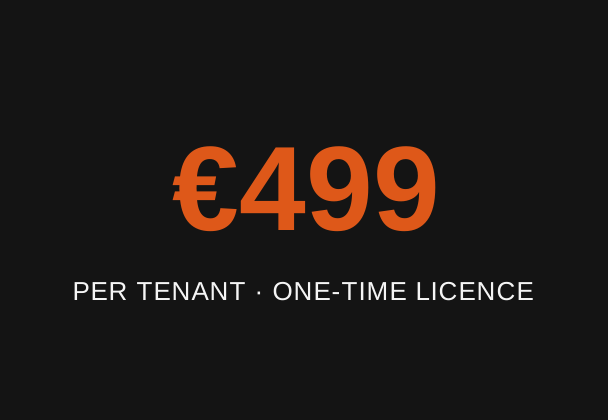
€499 per tenant, one-time licence. No subscription, no per-gigabyte or per-user pricing. Registered MSPs get 25% off.
- Per Microsoft 365 tenant
- All sources included
- Perpetual licence
- Support included
Try it on your own data, free
You don't have to take our word for it. Run a free, unlicensed trial of the real product: connect your tenant, list your projects, and run Preview and Compare as much as you like. To prove the migration itself, not just the preview, the trial also copies up to 20 of your own files for real into your own tenant so you can verify the result. It answers the one question that matters before you buy: does it move my data correctly.
Every feature in the trial works exactly as it will once licensed. This is the full product on your own data, not a cut-down demo. The 20-file cap applies only to the unlicensed trial, a full licence removes it and migrates every file.
Designed for real migration projects
- Runs entirely within your own environment
- Source platform remains read-only
- No third-party cloud handling your data
- Uses supported Microsoft APIs
- Detailed per-file auditing
- Cryptographically verifies every file transferred
- Built for repeatable delivery
- Perpetual tenant licensing
- No per-gigabyte or per-user pricing
Supported sources
Every supported source uses the same Liscaragh Migrate interface and is covered by a single licence. Cloud platforms connect using their supported APIs, while local drives and network shares are read directly from the file system, with no intermediary cloud service. The same auditing, reporting and migration workflow applies regardless of the source.
Datto Workplace
Available today. Migrate directly from Datto Workplace into SharePoint or OneDrive.
Read more →Local file and network storage
Available today. Migrate directly from local drives and network shares into SharePoint or OneDrive, including Linux, Mac and NAS shares, with file names auto-corrected for SharePoint and case-only duplicates flagged before they clash.
Read more →SharePoint (inter-tenant and intra-tenant)
Planned. Move SharePoint content between tenants, for example after an acquisition or divestiture, or reorganise sites and libraries within the same tenant. Register your interest and we'll let you know when support becomes available.
Google Drive and Shared Drives
Planned. Migrate directly from Google Drive and Shared Drives into SharePoint or OneDrive. Register your interest and we'll let you know when support becomes available.
Box
Planned. Register your interest and we'll let you know when support becomes available.
Dropbox
Planned. Register your interest and we'll let you know when support becomes available.
How it works
-
Connect
Connect to your source using read-only access and to Microsoft 365 using an app registration with least-privilege permissions. A guided setup creates the Microsoft Entra application and certificate for you.
-
Compare and preview
Point it at what you want to move. It analyses the source, shows you the structure and size, and flags anything SharePoint will object to, reserved names, path length and collisions, before a single file is copied.
-
Copy over the API
It transfers data directly from the source API into SharePoint or OneDrive, with no sync client and no staging share in between, automatically adapting to source and Microsoft 365 throttling.
-
Verify and report
Every file receives a recorded outcome. Re-run to pick up anything new or changed, and export a full report when the job is signed off.
See it running
This is the Liscaragh Migrate interface. Pick a project, set its destination, and run an upload or a sync. While it runs you get a live status card with progress, elapsed time and ETA, the current file and real throughput, a per-project status pipeline, throttle notices when Datto or Microsoft 365 pace the connection, and a full detailed log, finishing with a plain-English summary and a per-file audit trail. Try the tiles below.
This is an interactive demo, not a live application window. Everything below is simulated for illustration.
Interactive demo with simulated data. The layout, controls, status card and log mirror the actual Windows application.
Why Liscaragh Migrate is different
Liscaragh Migrate runs entirely on your own machine. Your data moves directly from the source into your Microsoft 365 tenant without passing through any Liscaragh infrastructure.
It streams data rather than staging an entire migration first. The source remains read-only throughout.
Every transferred file is verified and logged, giving you a complete audit trail of exactly what happened.
Licensing is simple. One perpetual licence per Microsoft 365 tenant, €499 one-time. No annual renewals, no per-user licensing and no per-gigabyte pricing.
The result is enterprise-grade migration capability without enterprise pricing or another cloud service sitting between your data and Microsoft 365.
Features
See what's new for what has shipped recently.
Perpetual tenant licensing
One flat licence per Microsoft 365 tenant, €499 one-time, and it's perpetual. No annual renewal, no charge per gigabyte moved, no per-seat maths. What a migration costs is fixed before you start and doesn't grow with the size of the estate.
Runs entirely on your machine
Data moves straight from the source into your own Microsoft 365 tenant. Nothing routes through a Liscaragh server, and none of your files or tenant details are sent anywhere.
Encrypted in transit and at rest
Every transfer runs over TLS on both legs, and files waiting on the transfer machine are AES-256 encrypted with a key held only in memory and destroyed when the run ends.
Read-only against the source
Only ever reads from the source, enforced in code. No writes, no deletes and no renames while you're still working in it.
Direct API to API
Streams straight from the source API into Microsoft 365, one file at a time through a small temp folder that is encrypted on disk and cleared before the next file. No sync client, and no staging copy of the whole estate to stand up.
Learns each tenant's rate limit
Rather than guessing, the adaptive pacer measures the source's fastest sustainable rate at run time and adapts to it, while backing off Microsoft 365 throttling automatically. It pushes as close to the maximum each side allows as it safely can, with no manual tuning.
Migrate projects in parallel
Move several projects at once, each in its own process with its own connection. This increases overall migration throughput by running multiple independent migration jobs simultaneously.
Pause and resume
Stop a run and pick it back up where it left off. A large migration doesn't have to happen in a single sitting.
Scheduled and overnight runs
Start a run later, or restrict it to a nightly window so migration activity stays inside a maintenance window automatically. It resumes as a Sync each night until the job is done. The app needs to stay open and the machine awake while a schedule runs, it is a built-in scheduler rather than a Windows scheduled task.
Keeps the machine awake while it works
A sleeping laptop is the most common silent killer of an overnight run. The app holds Windows awake for the duration of any run and says so in the activity feed, clearing the moment it finishes.
Preview before you copy
A dry run shows exactly what would move, and what would be renamed or skipped, before a single file is written. Check readiness goes a step further and scores the job A to D, A meaning migrate as-is, D meaning it is blocked on storage, and calls out how many gigabytes are sitting in duplicate files so cleanup is a decision made with numbers rather than a hunch. More on what the grade actually measures.
Handles SharePoint's awkward rules
Reserved names, path length and naming collisions are detected and resolved automatically, with every rename recorded.
Scoped and repeatable
Move a whole tenant or just one folder, merge into existing SharePoint content, and re-run Sync to pick up new and changed files without re-copying what already landed.
Continue migrations from any workstation
Export a migration's progress from one machine and import it on another to carry on where you left off. Run the first pass from one workstation and the nightly top-up from another without re-copying what already landed.
Where each file came from, written into SharePoint itself
Turn on provenance columns and every migrated file gets three fields in its own SharePoint library: source path, source owner and the date it was migrated, so the library can answer its own questions forever. Off by default, since it adds one extra version per file on libraries with versioning enabled. More on how this works.
Your naming convention becomes searchable metadata
A one-line rule turns folder depth into SharePoint columns, for example Client and Project from a Contoso Ltd/2024-118 Riverside Refit folder structure. For teams that name files by convention, the same idea works on the filename itself, pulling dates, drawing numbers and revisions out of the name. File type can populate a category column too, and content untouched for years gets flagged as a review candidate, so tidying up rides along with the migration instead of becoming its own project. Read the full breakdown.
Full per-file audit trail
Every file gets a logged outcome: copied, skipped, failed or repaired. The per-file record is the authoritative verdict, not a summary count. See what each report contains.
Verified by hash, three times over
Every file is verified by size and cryptographic hash as it lands. Additional Compare and Verify operations identify any differences between source and destination while accounting for Microsoft 365's handling of Office documents.
Client-ready reporting
Each run writes a single self-contained, branded HTML report you can send straight to a client or your manager as proof the job was done properly, covering what moved, how long it took and the security posture of the run. See a sample.
Completion certificate for sign-off
Produce a one-page completion certificate from a finished migration, ready for a client to sign off against. Issued once a job is fully copied, synced and verified.
Tamper-evident provenance pack
A manifest of every migrated file's path, size, content hashes and original modified date, countersigned by an independent RFC 3161 timestamp authority. Only the manifest's 32-byte hash ever leaves your machine.
Destination drift check
After a migration, check whether anything has been changed, deleted or added at the destination since the job moved it. Read-only, and useful right up to cutover.
Source review before you move
A read-only review of the source flags files shared by public link, files currently locked by a user, and files not yet fully in the cloud, so you can deal with them before they cause a surprise mid-run.
Read-only permissions plan
Map the source's share roles to intended Microsoft 365 access as a plan you review, without the tool ever writing permissions itself. Permissions do not cross the API, so this keeps that decision deliberate. What else doesn't cross, and why.
Rerun just the failures
If a handful of files failed, for example because they were locked at the source, rerun only those rather than the whole job. See what causes failures and how to fix them.
Email alerts on completion
Optional email when a run finishes, sent from your own Microsoft 365 tenant with the outcome, the numbers and the report attached. An overnight run that lands at 2am tells you at 2am.
Works behind a corporate proxy
Authenticates to an authenticated web proxy using the signed-in Windows identity, the same way Outlook does.
Get started
Request an evaluation build, book a demo, or get in touch about purchasing Liscaragh Migrate. If the platform you're interested in is still on our roadmap, we'll register your interest and let you know when support becomes available.
Learn more
- Security and data handling, for a review or a procurement questionnaire
- A sample migration report, the proof your client receives
- Migrating Datto Workplace to SharePoint, the full picture
- Migrating file shares and local storage to SharePoint, what trips it up
- Frequently asked questions, on pricing, licensing and what does and does not migrate
Have a question first? Contact us.